Social Icons

Sunday, May 23, 2010

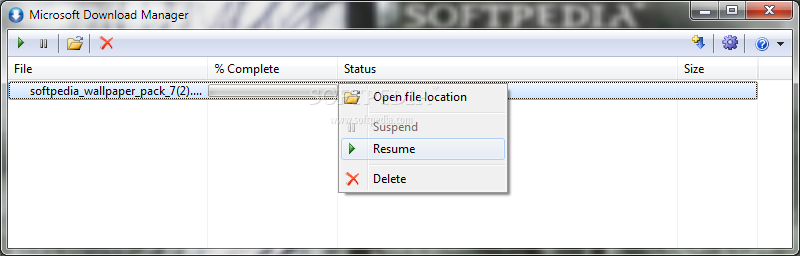
Windows Download Manager - for Windows 7


(click on image to view in actual size)

A free download manager designed to integrate seamlessly with Windows 7 is now available from Microsoft. Dubbed the Microsoft Download Manager, the utility is designed, as the label implies, to help users administer their downloads beyond the boundaries of the browser. More often than not, downloading very large files can be problematic, especially in the context of an unreliable connection. It is precisely in scenarios like these that a download manager will carry out any download tasks to the end, unlike browsers missing this functionality.

Friday, May 21, 2010

Sysinternals Suite - Troubleshooting tools for Windows


The Sysinternals Troubleshooting Utilities have been rolled up into a single Suite of tools. This file contains the individual troubleshooting tools and help files. It does not contain non-troubleshooting tools like the BSOD Screen Saver or NotMyFault.

The Suite is a bundling of the following selected Sysinternals Utilities:

AccessChk
AccessEnum
AdExplorer
AdRestore
Autologon
Autoruns
BgInfo
CacheSet
ClockRes
Contig
Coreinfo
Ctrl2Cap
DebugView
Desktops
Disk2vhd
DiskExt
DiskMon
DiskView
Disk Usage (DU)
EFSDump
Handle
Hex2dec
Junction
LDMDump
ListDLLs
LiveKd
LoadOrder
LogonSessions
NTFSInfo
PageDefrag
PendMoves
PipeList
PortMon
ProcDump
Process Explorer
Process Monitor
ProcFeatures
PsExec
PsFile
PsGetSid
PsInfo
PsKill
PsList
PsLoggedOn
PsLogList
PsPasswd
PsService
PsShutdown
PsSuspend
RAMMap
RegDelNull
RegJump
RootkitRevealer
SDelete
ShareEnum
ShellRunas
SigCheck
Streams
Strings
Sync
TCPView
VMMap
VolumeID
WhoIs
WinObj
ZoomIt


RAMMap 1.0 - Windows 7 RAM Analysis Tool


Have you ever wondered exactly how Windows is assigning physical memory, how much file data is cached in RAM, or how much RAM is used by the kernel and device drivers? RAMMap makes answering those questions easy. RAMMap is an advanced physical memory usage analysis utility for Windows Vista and higher. It presents usage information in different ways on its several different tabs:
  • Use Counts: usage summary by type and paging list
  • Processes: process working set sizes
  • Priority Summary: prioritized standby list sizes
  • Physical Pages: per-page use for all physical memory
  • Physical Ranges: physical memory addresses
  • File Summary: file data in RAM by file
  • File Details: individual physical pages by file
Use RAMMap to gain understanding of the way Windows manages memory, to analyze application memory usage, or to answer specific questions about how RAM is being allocated. RAMMap’s refresh feature enables you to update the display and it includes support for saving and loading memory snapshots.


(272 KB)


Thursday, May 20, 2010

Audacity® - The Free, Cross-Platform Sound Editor


Audacity is a free, easy-to-use and multilingual audio editor and recorder for Windows, Mac OS X, GNU/Linux and other operating systems. You can use Audacity to:
  • Record live audio.
  • Convert tapes and records into digital recordings or CDs.
  • Edit Ogg Vorbis, MP3, WAV or AIFF sound files.
  • Cut, copy, splice or mix sounds together.
  • Change the speed or pitch of a recording.

Audacity is available for Windows,Linux and Mac platforms . click below icon to go to download page.

Microsoft Robotics Developer Studio R3 2.2.76.0


Overview

Microsoft® Robotics Developer Studio 2008 R3 enables hobbyists and professional or non-professional developers to create robotics applications targeting a wide range of scenarios. The R3 release is a minor update that has the functionality of the previous Standard Edition, but is available at no cost to all users. As of the R3 release there are no separate Editions and only a single download.

Microsoft Robotics Developer Studio can support a broad set of robotics platforms by either running directly on the platform (if it has an embedded PC running Windows) or controlling it from a Windows PC through a communication channel such as Wi-Fi or Bluetooth®.

In addition to providing support for Microsoft Visual Studio 2010, Microsoft Robotics Developer Studio 2008 R3 provides a Visual Programming Language (VPL) which allows developers to create applications simply by dragging and dropping components onto a canvas and wiring them together.

The powerful Visual Simulation Environment (VSE) provides a high-fidelity simulation environment powered by NVIDIA™ PhysX™ engine for running game-quality 3D simulations with real-world physics interactions.

To help developers getting started, the Robotics Developer Studio contains extensive documentation and a large set of samples and tutorials that illustrate how to write applications ranging from simple "Hello Robot" to complex applications that simultaneously run on multiple robots.
 
The Microsoft Robotics Developer Studio 2008 R3 is available for download here
 
 
Blogger Templates http://slots.to/