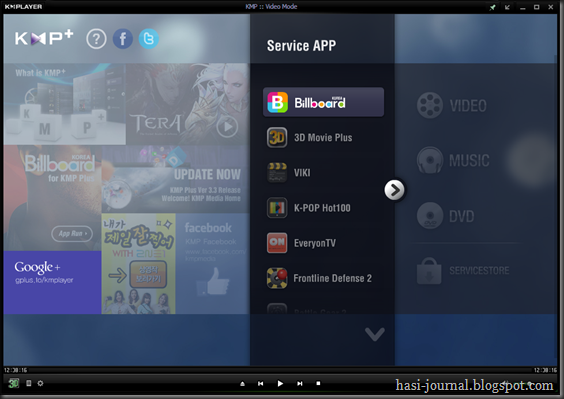
KMPlayer is all in one media player, covering various formats such as VCD, DVD, AVI, MKV, Ogg Theora, OGM, 3GP, MPEG-1/2/4, WMV, Real Media, and QuickTime. It has an extra feature to play Incomplete/Damaged AVI file, Locked Media Files while downloading or sharing, Compressed Audio Album (zip, rar) and so on. It handles a wide range of subtitles and allows you to capture audio, video, and screenshots in many ways. The player provides both internal and external filters with a fully controlled environment without grappling with DirectShow merit system. The player can set multifarious audio and video effects, control playback speed and octave, select parts of a video as favorites, do a powerful A-B repeat, remap the keys of remote interface for HTPC including overlay screen controls, change a skin dynamically depending on a media type playing, and many more. It is completely customizable thanks to a wide selection of skins and color schemes, and configuration options are extensive. KMPlayer is one of the most powerful video players in the world and trying to offer the best media entertaining environment for users. With new vision and dedication for the better user experience of video entertaining, we will keep listen and communicate with users of KMPlayer

Saturday, July 14, 2012
KMPlayer 3D: A Whole new look , feel and capabilities.


Sunday, June 10, 2012
Profit_Loss Calculator major UI Update

Profit&Loss calculator has been undergone a rapid update schedule these days and today I modified the structure of the program entirely to facilitate better user experience and versatility. and furthermore on the script I have added Interest calculation feature to cater more accurate cost calculation but of course I made those fields optional so that you may leave them blank. more updates can be anticipated on this week.
On this week I added a simple but useful feature. as you know orders aren’t always filled in full quantities for an example if we place a sell order for some 1000 shares this quantity may get executed by parts of 100,500,233,…etc so In such events you don’t need to calculate how many shares have been sold separately. In the sell quantity text fields just enter the quantities separated by ‘+’ operator and the total sold quantity will be calculated on the fly. (see the image below)
On this week I added a simple but useful feature. as you know orders aren’t always filled in full quantities for an example if we place a sell order for some 1000 shares this quantity may get executed by parts of 100,500,233,…etc so In such events you don’t need to calculate how many shares have been sold separately. In the sell quantity text fields just enter the quantities separated by ‘+’ operator and the total sold quantity will be calculated on the fly. (see the image below)
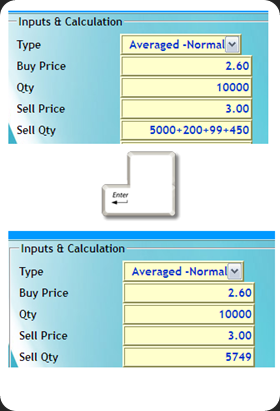
Furthermore I have added profit calculation and Quantity calculation features. which facilitates investor and alike to make their trading experiences more fruitful. More updates are coming up. Enjoy folks. Happy trading.
Sunday, May 20, 2012
Introducing - Average cost calculator for CSE equity trading

After playing around with my Profit/Loss calculator for few weeks I decided to develop this simple yet useful average cost calculator for equity trading in CSE. The Scenario is quite straightforward , An investor already has X amount of ABC shares at an averaged price of Rs. P1 and he needs to know what will be the average price if he buy Y amount of ABC shares at Rs. P2. or sell Z ( where Z<=X) amount at Rs P3.
If you are tangled in the above scenario , then Average price calculator is the solution for you. please note that the Average price calculator works only with Mozilla Firefox and Google Chrome. I'm having an issues getting it work on IE. Please make sure to check out my Profit/Loss calculator as well.
Tuesday, May 31, 2011
Luxand Blink: Login to PC using Webcam

Luxand Blink is a free software that lets you login to your PC by using Webcam and Facial Recognition. Blink utilizes excellent and efficient software to register your face. It then lets you login via your webcam, just by looking into it. It uses advanced face recognition for that.
This adds an extra layer of security to your computer and a more secure way of logging into your system. Some may be inclined to call it a bit of a novelty product, but for many it is a viable, efficient, and secure way of logging into the system. This is especially useful on those computers that do not have advance login features, like Fingerprint recognition.
Sunday, October 17, 2010
MS Fix it Center : fixes common PC and device problems automatically.
Microsoft has developed the Fix It Center tool, which includes all of the automated fixes for various Windows problems it has released over the last few years. Download and install it from here , then launch the tool from its desktop shortcut.

A list of available troubleshooters for your version of Windows will be listed; if one describes the problem you're having then click the Run button next to it and see if it can resolve your problem.
Microsoft Fix it Center makes getting support easier than ever because automatic troubleshooters solve the issues you have now and prevent new ones. Microsoft Fix it Center personalizes solutions for your device, showing you only what matters to your hardware and software. Microsoft Fix it Center gives you an easy way to stay in control and support all your devices
Subscribe to:
Posts (Atom)