Social Icons

Tuesday, May 25, 2010

Recuva - Free file data recovery tool


From the maker of the popular CCleaner. Recuva (pronounced “recover”) is a freeware Windows utility to restore files that have been accidentally deleted from your computer. This includes files emptied from the Recycle bin as well as images and other files that have been deleted by user error from digital camera memory cards or MP3 players. It will even bring back files that have been deleted by bugs, crashes and viruses
Features

Undelete files on your computer

Deleted a file by mistake? Recuva brings lost files on your computer, USB drive, camera or iPod.

Recovery from damaged or formatted disks

Even if you've formatted a drive so that it looks blank, Recuva can still find your files on it.

Recover deleted emails

Emptied your email trash and need it back? Recuva's got you covered with full support for Microsoft Outlook Express, Mozilla Thunderbird, or Windows Live Mail.

Recover deleted iPod music

Deleted music from your iPod or MP3 player? No problem, Recuva will get this back for you along with any additional track data.

Restore unsaved Word documents

Did Microsoft Word crash or did you forget to save that important Word document. No problem with Recuva! As it can intelligently rebuild Word documents from their temporary files.

Quick-Start Wizard

If you need your files back right away without fiddling with options, Recuva's Quick-Start Wizard is the answer.

Deep Scan

Recuva can find most files within a minute. Or, set the Deep Scan to look for more deeply-buried results.

Securely delete files you want to erase forever

Want to protect your deleted files? Recuva also allows you to permanently erase any traces of deleted files.

Portable version

Take Recuva with you wherever you go with the portable version.

Full Windows OS support and many languages

Recuva has support for every modern version of Windows and 37+ languages.

File Renamer Basic - Rename multiple files with ease


File Renamer Basic is a powerful and yet easy to use program that allows the user to rename files, folders, and MP3 files with ease. It has a filename filter so you can easily narrow down your search to only a specifc type of file or filename to work with. You can also remove x number of characters starting from x character and even find and replace text. In addition to its renaming capabilities, it also has a built-in ID3v1 and ID3v2 tag editor.

EasyBCD 1.7.2 - Windows bootloader editor


EasyBCD is NeoSmart Technologies' multiple award-winning answer to tweaking the new Windows 7/Vista bootloader. With EasyBCD, almost anything is possible. Setting up and configuring Windows boot entries is simple, and there is no easier way to quickly boot right into Linux, Mac OS X, or BSD straight from the Windows 7/vista bootloader - on the fly, no expert knowledge needed. If you are stuck with old bootloader entries which no longer exists this is the toll for you.

EasyBCD is geared for users of all kinds. Whether you just want to add an entry to your old XP partition or want to create a duplicate for testing purposes; if you're interested in debugging the Windows Kernel or septuple-booting your seven test operating systems, EasyBCD is the key.

Monday, May 24, 2010

Pazera Free Video to 3GP Converter 1.2


Pazera Free Video to 3GP Converter is the freeware application which converts the most popular videos (AVI, DivX, XviD, MPEG, MPG, WMV, ASF, MOV, QT, FLV, SWF, MP4, M4V, 3GP, 3G2, MKV, VOB, DAT) into mobile phone video format (3GP or 3G2). The application allows you to convert full movie or selected range only. You can limit output file size and set many parameters used by encoder: audio and video bitrate, fps, resolution, sampling frequency and other.


Sunday, May 23, 2010

PowerDVD 10 - Most advanced Movie/Media player


Release of late , PowerDVD 10 seems to be the most advanced and sophisticated Media player till date.  I have been using PowerDVD to play  DVDs and other media since it's version 6. Unfortunately it is not a freeware but i was compelled to post about it's new features and capabilities because you don't need any other media player in your PC . PowerDVD 10 can now paly Matroska(mkv) ,  Flash video (flv) . A major improvement over it's previous releases. Most remarkable addition is TrueTheater 3D technology. which enables you to play DVDs/BlueRay movies in 3D instead of 2D rendering. I think no other contemporary player supports 3D yet.
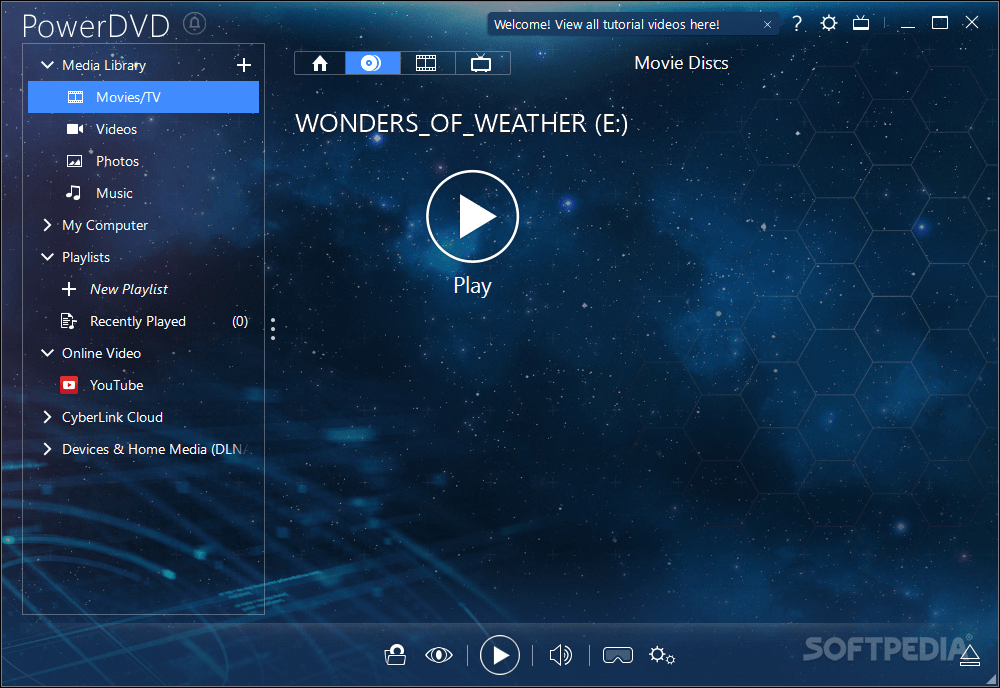
And also  PoweDVD user interface now includes a media browser with which you can browse for media files (Vedio/Audio) and play instantly or add to a playlist just by clicking a button and last but not least it allows you to upload your selected media to YouTube.

Some Screenshots 


Feauters and System requirments

Brilliant Blu-ray Movies:
Experience Blu-ray movies the way that only PowerDVD can offer: simply unbeatable quality. Optimized for the latest hardware acceleration technologies from Intel, NVIDIA and AMD, PowerDVD ensures smoother movie performance. PowerDVD 10 launches your Blu-ray movies up to 4X faster too.

Play DVDs in 3D
3D movie player PowerDVD takes you to new heights of visual excellence for standard DVD content. Featuring advanced TrueTheater 3D technology, PowerDVD converts 2D movies into a spectacular 3D experience. Optimize playback quality for your movie content and hardware.

Upscale DVDs and Videos to HD:
Enjoy better movie playback quality for both your DVDs and video files with TrueTheater HD upscaling technology. DVD and media player PowerDVD lets you output to an HDTV in a quality that looks noticeably sharper and clearer. Optimization for hardware acceleration ensures even smoother results.

Home Theater Music:Supporting the latest music library features of Windows 7, PowerDVD makes it even easier to listen to music from the player you use to enjoy your movies. Create playlists of favorite tunes. Use TrueTheater Surround technology to optimize your audio for home theater and PC hardware. Sounds great!

Movie Reviews and Live Comments:Create movie reviews that other users can read and play using PowerDVD. MovieMarks combine bookmarks and review comments and can be shared online via MoovieLive.com. Meanwhile, Live Comments let you post your opinions to Facebook, Twitter and MoovieLive while your movie is playing.

High Definition Audio Playback:3D and HD movie player PowerDVD lets your ears enjoy the ultimate movie experience too, with support for high-definition audio formats from Dolby Digital and DTS. Support for HDMI 1.3a delivers the purity of lossless HD audio via a single convenient cable to your home theater system.

Enhanced Video Playback:
With PowerDVD home videos can be enhanced using TrueTheater Stabilizer and TrueTheater Noise Reduction to improve quality as you play. As a universal player, PowerDVD now plays even more formats, gives you access to online movie trailers via MoovieLive, and lets you upload files to YouTube.


Requirements:

To play DVDs

· Screen Resolution: 1024 x 768 or 1280 x 1024
· Screen Ratio: 4:3 or 16:9 widescreen
· Intel Pentium 4 2.4 GHz (Pentium 4 3.0 GHz or above recommended)
· AMD Sempron 2600+ 1.6 GHz (Athlon 64 2800+ 1.8GHz or above recommended)
· Memory: for XP: 256 MB, for Vista: 512 MB
· Graphics Card: AGP or PCI Express graphic accelerator supporting DirectX 9.0.
· Sound Card: PCI sound card or on-board audio.
· Optical Drive DVD-ROM, DVD-ROM/CD-RW combo, DVD-R/RW, DVD+RW or DVD-RAM drive for playing VCDs and DVDs.

To play Blu-ray Discs

· Screen Resolution: 1920 x 1080
· Screen Ratio: 16:9 widescreen

Processor:
· Intel: Pentium 4 541 3.2 GHz, Pentium D 840 3.2 GHz, Pentium D 930 3.0 GHz, 935 3.2GHz or 940 3.2 GHz, Core Duo T2400 1.83 GHz, Pentium M 755 2.0 GHz, Core 2 Duo E4300 1.8 GHz, or T5600 1.83 GHz
· AMD: Athlon 64 X2 3800+ 2.0 GHz or 4000+ 2.0 GHz, Turion 64 X2 TL-50 1.6 GHz, TL-52 1.6 GHz or TL-56 1.8 GHz
· Memory: for XP: 512 MB, for Vista: 1 GB
· Hard Disk Space: 150 MB

Graphics Card:
· Intel 965G
· nVidia: GeForce 7600 GT, GeForce 7800 GTX 512, GeForce 7900 GX2, GeForce 7900 GTX, GeForce 7950 GX2, GeForce 8400 series, GeForce 8500 series, GeForce 8600 series, GeForce 8800 series
· ATI: ATI Radeon X1600 series, X1800 series, X1900 series
· Sound Card: PCI sound card or on-board audio
· Optical Drive: Blu-ray Disc drive for playing Blu-ray Discs and DVDs.


Blogger Templates http://slots.to/