Social Icons

Sunday, April 28, 2013

JStockCharts update- WatchList & Percentage Price Oscillator Chart


If you are new to JStockCharts please refer to this post.

I have been working on a way to enable users to save his favorite/holding shares and daily monitor their trading summary through a single window. The Latest feature of the JStockCharts , WatchList enables users to accomplish this task. It simply provides a window to add/remove your desired shares to the table on the right side, once you updated the latest price list to the application you can go ahead and analyze the trading summary of the shares in your watchList easily by clicking the ico_alpha_ClipboardEdit_24x24 icon in the toolbar or by going through Tools menu.

wl

Technical Indicator – PPO ( Percentage Price Oscillator)
The Percentage Price Oscillator (PPO) is a momentum oscillator that measures the difference between two moving averages as a percentage of the larger moving average. As with its cousin, MACD, the Percentage Price Oscillator is shown with a signal line, a histogram and a centerline. Signals are generated with signal line crossovers, centerline crossovers and divergences. Because these signals are no different than those associated with MACD, this article will focus on a few differences between the two. First, PPO readings are not subject to the price level of the security. Second, PPO readings for different securities can be compared, even when there are large differences in the price.
Reference : StockCharts.com
This useful indicator charts are available for over 03 Months periods.
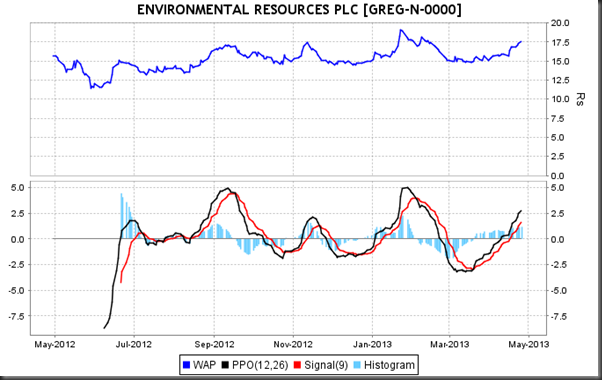
ppo

___________________________________________________________________
Official Site
http://wkhhost.hostoi.com/JChartsWeb/index.html

Direct download
https://sourceforge.net/projects/jchartscse/files/latest/download

WAP File mailing-list(Please subscribe to receive daily WAP File)
https://lists.sourceforge.net/lists/listinfo/jchartscse-wapfeed
____________________________________________________________________________

Monday, April 8, 2013

Introducing JStockCharts - Technical Analysis tool for Equity trading in Colombo Stock Exchange (CSE)


JStockCharts is a java based charting application with added features such signal generator and historical price viewer, chart comparison tool. Supports all widely used technical indicators. The system uses a local database to which a price list (WAP File) shall be uploaded daily. The file can be obtained by subscribing to the wap feed mailing-list.


Available chart types
Following chart types are available if you select over 03 months time period. This list grows frequently so make sure to subscribe to my blog to receive updates about new additions to the application and chart types.


Sample Charts
Price & Turnover

Relative Strength Index

Ease of Movement
       

Candlestick Chart


Technical indicator value generator

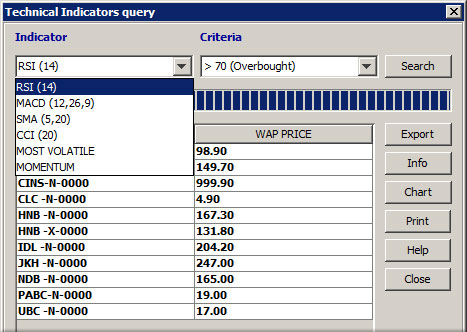
Using this tool users can query for counters which meet certain criteria such as , this list keeps getting longer with weekly updates. (subscribe to the official mailing-list to receive update notifications)

  • MACD crossing the signal line from below , from above etc
  • RSI overbought/oversold counters
  • SMA - Cross from below/above
  • CCI - overbought/oversold 
  • Volatility
  • Momentum
  • New 52Week High/Low


Historical Prices

This tool enables users to

  • View OHLC , Turnover and Volume data for a specific counter for a specific date or for  a date range and all counters for a specific date or date range. 
  • View High Low prices for all counters or a selected counter (Highs & Lows) ,
  • View if a selected counter recorded a given gain percentage over a specific time period. (Gain Analyzer)


Counter Comparison Tool

This too enables users to compare various shares in a single window. select shares , select a chart type , select a grid type and you are provided with multiple charts withing the same container. Also users are able to draw line charts of different counters in the same plot (Line (Combined)).


Line (Combined) Chart type
_________________________________________________________________
Official Site
http://wkhhost.hostoi.com/JChartsWeb/index.html

Direct download
https://sourceforge.net/projects/jchartscse/files/latest/download

WAP File mailing-list(Please subscribe to receive daily WAP File)
https://lists.sourceforge.net/lists/listinfo/jchartscse-wapfeed
_________________________________________________________________

System Requirements:
*. Java Run-time version 7 or above (Download)
*. Supported Operating Systems : Windows XP or above, Linux , MAC OS X, Solrais

Installation
No installation is required , you can use this as a portable application.

1. Download JStockCharts.rar by visiting the above direct download link.
2. Extract the downloaded file in to a desired location (e.g C:\)
3. Add shortcut to the JStockCharts.exe file to the desktop.
4. Run the application using the above shortcut.

Enjoy!!

Google+ 

Monday, December 24, 2012

Comma separation code in Java


Displaying large figures without comma separation is quite daunting to the users. For an example just think how hard to discern the value of 9501625237.56 ? Instead of displaying such number as it is we can format the said value using commas which would be more readable , like this  9,501,625,237.56 If displayed likewise An user wouldn't have to waste time deciphering such lengthy values. Here is the code I wrote to accomplish this output using Java to utilize into much larger programs. The method can be overridden or overloaded as you would deem necessary. 

Input : Takes the value to be formatted as a  String object.
Returns: Formatted value as a String object.
private String addCommas(String strn){

         String commaSeparatedNumber="", decimals="";
        //split contents before the decimal point

        commaSeparatedNumber = strn.contains(".") ?   strn.split("\\.")[0] : strn;
        decimals = strn.contains(".") ? "."+strn.split("\\.")[1] : "";

        /*create a regular expression for the thousand separator, store those matches separately for the replacement.*/
        String regx="(\\d+)(\\d{3})";

        //create pattern and matcher objects to find matches
        Pattern p = Pattern.compile(regx);
        Matcher m = p.matcher(commaSeparatedNumber);

        //iterate to find the next match.
        while(m.find()){
            //replace the found matching groups with the comma.
            commaSeparatedNumber = commaSeparatedNumber.replaceFirst(regx, m.group(1) +","+ m.group(2));
            //update the matcher with new replacements.
            m = p.matcher(commaSeparatedNumber);
        }

        return commaSeparatedNumber+decimals;
    }


Monday, September 24, 2012

Average Cost Calculator - Redefined


Hey there Fellow readers, After an interval I have some time to look into Trading calculators one of these days. Hence fresh improvements in my projects can be expected in coming weeks. First of such improvements goes in to Average Cost calculator, wherein I have made major overhaul in the code. So the changes may not be apparent. But the UI looks good , the code looks good so I feel much better. And I'm pretty confident that It could be made to a more robust application. Major changes was made to JS code to optimize and avoid redundancies. Data structures have been utilized to store contracts so that all the transactions can be viewed using The Trades button, which is a new addition to the previous version. Number of  Trade types have been increased to 4 where Day-Sell and Day-Buy options are included. User can opt to add brokerage to the first contract if the calculated average price is available. This is indeed the case most of the time since the average costs are included in the most portfolio statements. Await for further changes and improvements .Cheers.

Saturday, July 14, 2012

KMPlayer 3D: A Whole new look , feel and capabilities.


untitledfff  
KMPlayer is all in one media player, covering various formats such as VCD, DVD, AVI, MKV, Ogg Theora, OGM, 3GP, MPEG-1/2/4, WMV, Real Media, and QuickTime. It has an extra feature to play Incomplete/Damaged AVI file, Locked Media Files while downloading or sharing, Compressed Audio Album (zip, rar) and so on. It handles a wide range of subtitles and allows you to capture audio, video, and screenshots in many ways. The player provides both internal and external filters with a fully controlled environment without grappling with DirectShow merit system. The player can set multifarious audio and video effects, control playback speed and octave, select parts of a video as favorites, do a powerful A-B repeat, remap the keys of remote interface for HTPC including overlay screen controls, change a skin dynamically depending on a media type playing, and many more. It is completely customizable thanks to a wide selection of skins and color schemes, and configuration options are extensive. KMPlayer is one of the most powerful video players in the world and trying to offer the best media entertaining environment for users. With new vision and dedication for the better user experience of video entertaining, we will keep listen and communicate with users of KMPlayer
untitled
 
 
Blogger Templates http://slots.to/