Social Icons

Showing posts with label Multimedia. Show all posts

Wednesday, June 23, 2010

VLC 1.1.0 - ready for HD with webM


WIndows/Mac/Linux: VLC, Most famous plays-it-all download, has rolled out its official 1.1 release, cementing the hardware video acceleration for smoother HD playing, bundling support for the open WebM video standard, and implementing lots of fixes and speed-ups in the code.

Untitled

WIndows/Mac/Linux: Most popular plays-it-all download, has rolled out its official 1.1 release, cementing the hardware video acceleration for smoother HD playing, bundling support for the open WebM video standard, and implementing lots of fixes and speed-ups in the code.

Along with the list of improvements, there is something entirely new and notable about 1.1, but not in a good way. AOL, the owner of NullSOFT and, therefore, the Shoutcast streaming protocol, has demanded that VLC remove support for showing a directory of the web's SHOUTcast streams from its player, unless it changed its license and bundled other AOL software with VLC. The media player makers declined, of course, but have put some links to AOL team leaders' email addresses on their page, so that fans of VLC can show their support for open software.

so far, on Windows for GPU decoding, VideoLAN is recommending nVidia® GPU, until ATI® drivers are working with VLC architecture, and until the VLC developers get access to some Intel® hardware supporting GPU decoding.

download_button

Saturday, June 12, 2010

MakeMKV – cross-platform DVD / Blue-Ray Disc Ripper


Software developers basically have DVD ripping down to a science at this point. No matter what operating system you run, you're only a few clicks away from importing a movie from a DVD to your hard drive. Blu-Ray, on the other hand, is a tougher nut to crack. That's why it's exciting to see a cross-platform app that handles both DVD and Blu-Ray ripping: MakeMKV.

sshot-t3-web

MakeMKV offers one-click ripping of most DVDs and Blu-Ray discs on Mac, Windows or Linux.

Additionally MakeMKV can instantly stream decrypted video without intermediate conversion to wide range of players, so you may watch Blu-ray and DVD discs with your favorite player on your favorite OS or on your favorite device.

  • Reads DVD and Blu-ray discs
  • Reads Blu-ray discs protected with latest versions of AACS and BD+
  • Preserves all video and audio tracks, including HD audio
  • Preserves chapters information
  • Preserves all meta-information (track language, audio type)
  • Fast conversion - converts as fast as your drive can read data.
  • No additional software is required for conversion or decryption.
  • Available for Windows, Mac OS X and Linux
  • Functionality to open DVD discs is free and will always stay free.
  • All features (including Blu-ray decryption and processing) are free during BETA.

Download MakeMKV beta. for  Windows , OS X

Download MakeMKV beta for Linux

Thursday, June 10, 2010

MPlayer : The Best media player for Linux


MPlayer has a set of native codecs in libavcodec, which it borrows from the FFmpeg project, as well as a set of binary codecs for playing videos in proprietary containers. With these two, you can throw all your MPEG, AVI, ASF, WMV, RM, QT, MP4, OGG, MKV and FLV files at MPlayer and it'll play them.

LXF122.round.mpbody1-420-420-90 
MPlayer is a movie player which runs on many systems (Windows , Linux , OS X , Solaris ) . It plays most MPEG/VOB, AVI, Ogg/OGM, VIVO, ASF/WMA/WMV, QT/MOV/MP4, RealMedia, Matroska, NUT, NuppelVideo, FLI, YUV4MPEG, FILM, RoQ, PVA files, supported by many native, XAnim, and Win32 DLL codecs. You can watch VideoCD, SVCD, DVD, 3ivx, DivX 3/4/5, WMV and even H.264 movies.

Another great feature of MPlayer is the wide range of supported output drivers. It works with X11, Xv, DGA, OpenGL, SVGAlib, fbdev, AAlib, DirectFB, but you can use GGI, SDL (and this way all their drivers), VESA (on every VESA compatible card, even without X11!) and some low level card-specific drivers (for Matrox, 3Dfx and ATI), too! Most of them support software or hardware scaling, so you can enjoy movies in fullscreen. MPlayer supports displaying through some hardware MPEG decoder boards, such as the Siemens DVB, DXR2 and DXR3/Hollywood+.

MPlayer has an onscreen display (OSD) for status information, nice big antialiased shaded subtitles and visual feedback for keyboard controls. European/ISO 8859-1,2 (Hungarian, English, Czech, etc), Cyrillic and Korean fonts are supported along with 12 subtitle formats (MicroDVD, SubRip, OGM, SubViewer, Sami, VPlayer, RT, SSA, AQTitle, JACOsub, PJS and our own: MPsub). DVD subtitles (SPU streams, VOBsub and Closed Captions) are supported as well.

Download or install MPlayer via Synoptic Package manager.

Monday, June 7, 2010

Miro : Download torrents and podcasts, play any video


Miro is a free HD video player and torrent downloader. It can play almost any video file and offers over 6,000 free internet TV shows and video podcasts. You can subscribe to channels of Internet video, download videos, and watch them full screen, one after the other, all in one application. Miro has a simple interface designed for fullscreen HD video. Since Miro downloads most videos, you can take your shows with you, even on an airplane. Miro is completely free and open source.

Features include torrent support for downloading torrents and viewing their content in the same app; folder watching; resumable playback; channel surfing, which organizes video feeds by topic; video sharing and hosting; and assistance in creating and distributing videos. Version 3 introduces extensive subtitle support, better metadata management, and a higher maximum volume. Note that Miro's installation still opts users in to changes you might not want, such as making Bing your default search engine. As long as you're aware of it, though, Miro still makes for an excellent media management tool.

Miro Feature Guide. | Screenshots

Download Miro 3.0.2 for ( Windows | OS X | Ubuntu | Other Linux Distros)

Sunday, June 6, 2010

K3b - The CD/DVD Creator for Linux, optimized for KDE


welcome_screenshot_0.12

simulatingaudiocd

Firstly, K3b will happily burn and copy all kinds of single or multisession CDs and DVDs, and blank the rewriteable ones. It'll also encode your MP3 and OGG files into high-quality WAV format automatically, and burn them on to an audio CD. It'll do the same with your video files and produce a great video DVD.

Not only that, but K3b is as good at grabbing stuff off existing optical media as it is at putting data on it. As such, it will rip audio CDs and even multichapter video DVDs with consummate ease. The strength of K3b lies in the fact that it doesn't try to do everything on its own – it's folded the best tools for every task into its UI via plug-ins.

You can run it under Gnome, but it'll need a lot of dependencies. For simple CD/DVD burning tasks, Gnome users should probably go with one of the native Gnome apps instead. In terms of documentation, K3b bundles a four-year-old handbook and the low-traffic forum has more questions than answers. But these are superficial scratches on a rock-solid app that demands your attention.

download_button

Fotoxx : Photo manager for Linux


Fotoxx is a free open source Linux program for photo editing and collection management. The goal is to meet most user needs while remaining fast and easy to use.

620210-6835425-thumbnail

With Fotoxx you can Navigate a large image collection using a thumbnail browser. Import camera RAW files and edit with 16-bit color. Save edited images as TIFF-8/16, PNG or JPEG with adjustable compression. Edit the whole image or a selected area, with adjustable edge-blending. Edit functions have live feedback using the full window. Undo/redo up to 99 edits. Add tags, dates, and star-ratings to images and search using these criteria and (wildcard) file names. Fotoxx does not use filters, layers, and masks - the edit functions work directly on the image.

620210-6820785-thumbnail

The Panorama mode, for example, combines several shots, using a bit of manual placement from the user. Shots are placed one by one, and the results are pretty good – it isn't a replacement for stitching software, which creates a whole montage, but it does the job for a 360° panorama.

What Fotoxx calls HDF mode is a similar combination effect, but here it takes multiple images with different areas in focus, and tries to combine them into a continuous whole, giving an infinite depth of field.

There are plenty of other tricks, such as manual tone-mapping and HDR support. Again, this has the possibility for manual adjustment, so there's no problem taking separate images by hand rather than having a camera that takes three at once.

With support for a variety of RAW formats through the UFRaw libraries and 16-bit colour depth, Fotoxx can churn out high-quality images, given the right source material. There's basic tagging support using Exif data, but this is decentralised.

Some may argue this is a better way to organise images – Fotoxx stores your tags and other info direct to the Exif. The downside is that it has to index all the images if you're searching for a particular pic, which means knowing roughly where it is to begin with.

User Guide
Download Fotoxx DEB and RPM packages off here

Saturday, June 5, 2010

Windows Media Player Plus!


Windows media player plus is a free plug-in for Windows media player , not another Player as the post title implies ;-). It adds various user interface and media playback enhancements .There are a bunch of enhancements of WMP plus .  for an example user can disable group headers in the Library Pane. (below two images)

disablegrouping_before_small
Before…

disablegrouping_after_small

.. and after. The group headers have been disabled, and Windows Media Player now displays a continuous list of library items, just like in Windows Media Player 10.

Other enhancements available in WMP plus!

  • Tag Editor Plus: an alternative for Windows Media Player's Advanced Tag Editor (screenshot). Tag Editor Plus works on Windows Media Player 12 too, where the original Advanced Tag Editor has been removed.
  • Real 'find as you type' in the library: you can simply start typing to search, without having to click on the Search field first
  • Access the standard Explorer right-click menu of a media file directly from within Windows Media Player (screenshot).
  • Restore last active playlist, media item, and playback position at Windows Media Player startup.
  • Show currently playing media in Windows Media Player's title bar (screenshot).
  • Enhanced and configurable replacement of the Windows Live Messenger Music plug-in (What I'm Listening To) (screenshot).
  • Access the properties/settings of any Windows Media Player plug-in from within the main menu (Tools - Plug-in properties), without having to go to Options first (screenshot).
  • Quickly re-enable all plug-ins after a Windows Media Player crash (screenshot).

With WMP plus installed WMP can be a better alternative for popular music players software like WinAmp , ITunes.

Thursday, June 3, 2010

How to play mkv (matroska) files in Windows media player


Matroska is a popular file container format among  Rippers for it’s smaller size. which can be played using third party Media players like KMPlayer , GOM Player or VLC etc.
But I rest assured none of those players renders better video quality than Good old Windows Media player. or any other Directshow player for that matter and WMP is more stable and can be relied upon. below screenshot shows four players showing the same scene of a movie. Difference is apparent.

players

upperleft – KMPlayer , UpperRight – Media player classic , Lower left – VLC , and we have Windows media player on  lower right.

By default WMP can’t play mkv becuase windows doesn’t provide neccesary codecs to decode mkv files and play them. So user must install those codecs. Which is a easy task. install K-Lite Codec pack on your system. It’s available in six different editions but the Basic package will be sufficient.

when installing K-Lite you’ll be prompted to choose components , leaves those settings as they are  and click next to contiue installation.

installklite-step4

In “Select Additional tasks window” choose file association for Windows media player. Media player classic also comes with the codec pack .

InstallKlite-Step6

Wednesday, June 2, 2010

Amarok 2.3.1 Released with Automated Playlist Generator


amarok-2.3.1

This release brings with it some exciting new features like the Automated Playlist Generator which helps you create playlists based on criteria like song length or file size. This is the start of bringing back the smart playlist feature of Amarok 1 and more.
Amarok’s developers have also added two new applets for the Context View. The Upcoming Events applet shows concerts and events that the currently playing artist is participating in and the Similar Artists applet uses the Last.fm database to show similar artist and makes the ones in your collection directly playable.
Cover fetching has seen a lot of improvements and we added support for the new system tray protocol.
The 2.3.1 release also fixes many bugs, both major and minor, and brings with it many other small improvements that overall help to make the Amarok experience even more enjoyable!

download

ImgBurn - Free disc-burning software


ImgBurn is a lightweight CD / DVD / HD DVD / Blu-ray burning application that everyone should have in their toolkit!

screenshot_ezmodepicker

screenshot_read

When it comes to disc-burning software, "Just works" is a big recommendation, because it really stinks to deal with image files, disc types, or driver incompatibilities right before you want to hit "Burn." ImgBurn works with CDs, DVDs, and Blu-Ray, creates and opens all kinds of image formats, and supports every Windows OS back to 95.

It has several 'Modes', each one for performing a different task:

  • Read - Read a disc to an image file
  • Build - Create an image file from files on your computer or network - or you can write the files directly to a disc
  • Write - Write an image file to a disc
  • Verify - Check a disc is 100% readable. Optionally, you can also have ImgBurn compare it against a given image file to ensure the actual data is correct
  • Discovery - Put your drive / media to the test! Used in combination with DVDInfoPro, you can check the quality of the burns your drive is producing

Download ImgBurn v 2.5.1.0 (4.5 MB)

Saturday, May 29, 2010

VLC 1.1.0 (RC)/ 1.0.5 Goldeneye


VLC is an extremely popular video player that is designed to play nice with Windows, Mac OS X and Linux. Part of the appeal that the application offers to users is the fact that it is pretty self-sufficient as far as video codecs go. In this regard, the promise from VideoLAN is that users will only need VLC and they will be able to play the vast majority of videos on the web, simply because the app comes with the necessary codecs integrated by default.

VideoLAN-Client_1

The Release Candidate build of VLC 1.1.0 is now available for download for users of Windows operating systems, including Windows 7. When offering the new RC Build of VLC Media Player 1.1.0, VideoLAN boasted a range of enhancements from performance to additional codec support, but also bug fixes, stability and reliability improvements, etc. The RC development milestone, while signaling the video player’s proximity to finalization, is still a pre-release Build designed for testing, and not for deployment into production environments.

Click below icon to download VLC player for Windows (18.2 MB). Player skins can be found here.

download_button

Friday, May 28, 2010

Pazera Free FLV to AVI Converter 1.2


Pazera Free FLV to AVI Converter is the free video converter that converts Flash Video files (FLV, SWF) into AVI or MPEG. That files can be played with any video player.
FLV files are commonly used in the Internet by such services as YouTube or Google Video


FLV files are commonly used in the Internet by YouTube, Google Video and other video services. Those files are not supported by Windows Media Player and other popular media players. To display FLV video you need to convert that file into more reliable format, such as AVI or MPG.
The program has a number of predefined settings (profiles) specially designed for novice users. While more advanced users can customize video and audio encoding parameters used by encoder: audio and video codec, audio and video bitrate, fps, sampling frequency, resolution, volume and other.
The Pazera Free FLV to AVI Converter interface is a very simple and user-friendly. To convert flash video files, just drag & drop them into main window and click CONVERT button. If the video quality is poor, increase video bitrate. 


4.8 MB

Monday, May 24, 2010

Pazera Free Video to 3GP Converter 1.2


Pazera Free Video to 3GP Converter is the freeware application which converts the most popular videos (AVI, DivX, XviD, MPEG, MPG, WMV, ASF, MOV, QT, FLV, SWF, MP4, M4V, 3GP, 3G2, MKV, VOB, DAT) into mobile phone video format (3GP or 3G2). The application allows you to convert full movie or selected range only. You can limit output file size and set many parameters used by encoder: audio and video bitrate, fps, resolution, sampling frequency and other.


Sunday, May 23, 2010

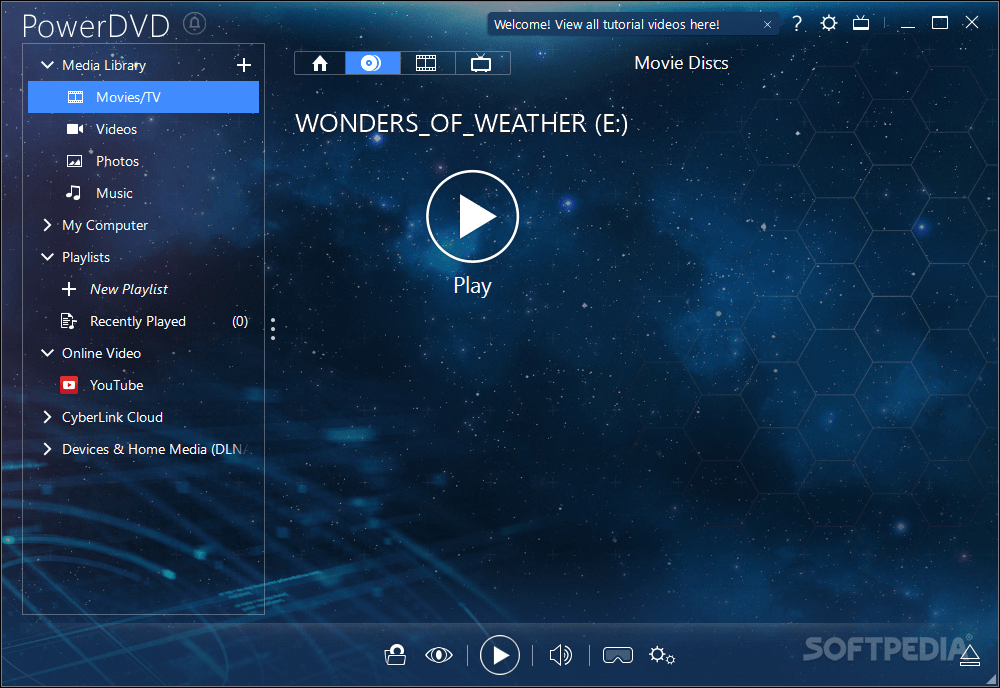
PowerDVD 10 - Most advanced Movie/Media player


Release of late , PowerDVD 10 seems to be the most advanced and sophisticated Media player till date.  I have been using PowerDVD to play  DVDs and other media since it's version 6. Unfortunately it is not a freeware but i was compelled to post about it's new features and capabilities because you don't need any other media player in your PC . PowerDVD 10 can now paly Matroska(mkv) ,  Flash video (flv) . A major improvement over it's previous releases. Most remarkable addition is TrueTheater 3D technology. which enables you to play DVDs/BlueRay movies in 3D instead of 2D rendering. I think no other contemporary player supports 3D yet.
And also  PoweDVD user interface now includes a media browser with which you can browse for media files (Vedio/Audio) and play instantly or add to a playlist just by clicking a button and last but not least it allows you to upload your selected media to YouTube.

Some Screenshots 


Feauters and System requirments

Brilliant Blu-ray Movies:
Experience Blu-ray movies the way that only PowerDVD can offer: simply unbeatable quality. Optimized for the latest hardware acceleration technologies from Intel, NVIDIA and AMD, PowerDVD ensures smoother movie performance. PowerDVD 10 launches your Blu-ray movies up to 4X faster too.

Play DVDs in 3D: 
3D movie player PowerDVD takes you to new heights of visual excellence for standard DVD content. Featuring advanced TrueTheater 3D technology, PowerDVD converts 2D movies into a spectacular 3D experience. Optimize playback quality for your movie content and hardware.

Upscale DVDs and Videos to HD:
Enjoy better movie playback quality for both your DVDs and video files with TrueTheater HD upscaling technology. DVD and media player PowerDVD lets you output to an HDTV in a quality that looks noticeably sharper and clearer. Optimization for hardware acceleration ensures even smoother results.

Home Theater Music:Supporting the latest music library features of Windows 7, PowerDVD makes it even easier to listen to music from the player you use to enjoy your movies. Create playlists of favorite tunes. Use TrueTheater Surround technology to optimize your audio for home theater and PC hardware. Sounds great!

Movie Reviews and Live Comments:Create movie reviews that other users can read and play using PowerDVD. MovieMarks combine bookmarks and review comments and can be shared online via MoovieLive.com. Meanwhile, Live Comments let you post your opinions to Facebook, Twitter and MoovieLive while your movie is playing.

High Definition Audio Playback:3D and HD movie player PowerDVD lets your ears enjoy the ultimate movie experience too, with support for high-definition audio formats from Dolby Digital and DTS. Support for HDMI 1.3a delivers the purity of lossless HD audio via a single convenient cable to your home theater system.

Enhanced Video Playback:
With PowerDVD home videos can be enhanced using TrueTheater Stabilizer and TrueTheater Noise Reduction to improve quality as you play. As a universal player, PowerDVD now plays even more formats, gives you access to online movie trailers via MoovieLive, and lets you upload files to YouTube.


Requirements:

To play DVDs

· Screen Resolution: 1024 x 768 or 1280 x 1024
· Screen Ratio: 4:3 or 16:9 widescreen
· Intel Pentium 4 2.4 GHz (Pentium 4 3.0 GHz or above recommended)
· AMD Sempron 2600+ 1.6 GHz (Athlon 64 2800+ 1.8GHz or above recommended)
· Memory: for XP: 256 MB, for Vista: 512 MB
· Graphics Card: AGP or PCI Express graphic accelerator supporting DirectX 9.0.
· Sound Card: PCI sound card or on-board audio.
· Optical Drive DVD-ROM, DVD-ROM/CD-RW combo, DVD-R/RW, DVD+RW or DVD-RAM drive for playing VCDs and DVDs.

To play Blu-ray Discs

· Screen Resolution: 1920 x 1080
· Screen Ratio: 16:9 widescreen

Processor:
· Intel: Pentium 4 541 3.2 GHz, Pentium D 840 3.2 GHz, Pentium D 930 3.0 GHz, 935 3.2GHz or 940 3.2 GHz, Core Duo T2400 1.83 GHz, Pentium M 755 2.0 GHz, Core 2 Duo E4300 1.8 GHz, or T5600 1.83 GHz
· AMD: Athlon 64 X2 3800+ 2.0 GHz or 4000+ 2.0 GHz, Turion 64 X2 TL-50 1.6 GHz, TL-52 1.6 GHz or TL-56 1.8 GHz
· Memory: for XP: 512 MB, for Vista: 1 GB
· Hard Disk Space: 150 MB

Graphics Card:
· Intel 965G
· nVidia: GeForce 7600 GT, GeForce 7800 GTX 512, GeForce 7900 GX2, GeForce 7900 GTX, GeForce 7950 GX2, GeForce 8400 series, GeForce 8500 series, GeForce 8600 series, GeForce 8800 series
· ATI: ATI Radeon X1600 series, X1800 series, X1900 series
· Sound Card: PCI sound card or on-board audio
· Optical Drive: Blu-ray Disc drive for playing Blu-ray Discs and DVDs.


Thursday, May 20, 2010

Audacity® - The Free, Cross-Platform Sound Editor


Audacity is a free, easy-to-use and multilingual audio editor and recorder for Windows, Mac OS X, GNU/Linux and other operating systems. You can use Audacity to:
  • Record live audio.
  • Convert tapes and records into digital recordings or CDs.
  • Edit Ogg Vorbis, MP3, WAV or AIFF sound files.
  • Cut, copy, splice or mix sounds together.
  • Change the speed or pitch of a recording.

Audacity is available for Windows,Linux and Mac platforms . click below icon to go to download page.

Wednesday, May 19, 2010

Best Media Players for Windows OS


What is the best Media player out there? Asking this question would be given an answer based on personal preferences or a subjective answer based on what is most popular media player. I tried to find answer for this question myself and choose to rank players according to editor’s rating in CNET.com . Following list consist of media players ordered so. Had I sorted this list as most popular media players It would have been a different one. cause popularity simply comes from the number of downloads.
Media players available to download  out there are developed using various media frameworks , programming languages so there features may differ from each other .

5. BS.Player

785639

Review/Download BS Player latest version

4. GOM Player

gom-media-player_19338

Review/Download GOM Player latest version

3. VLC Media Player

VLC_Media_Player_1.0.5_main_window

Review/Download VLC Player latest version

2. RealPlayer SP

RealPlayer-SP

Review/Download Real Player SP latest version

1. The KMPlayer

Foreman_11105067_4243_kmplayer

                                 Review/Download The KMPlayer latest version

Out of the media players I have used KMPlayer is the least  glitchy player I came across it handles the subtitles well Audio quality is good. And it does not give me following dialogs at all.

vlc error


Saturday, May 15, 2010

WinCDEmu 3.3 - CD/DVD emulator (FOS)


Features

WinCDEmu makes mounting CD/DVD images simple: double-click on an image file in Windows Explorer and a new drive letter with the mounted image will appear. You can mount as many images as you want at the same time, and you don't need to reserve drive letters when nothing is mounted. WinCDEmu supports ISO, CUE, NRG, MDS/MDF, CCD, IMG formats and runs on all Windows versions from WinXP to Win7.

Thursday, May 13, 2010

IrfanView - best free image editor


rfanView is a very fast, small, compact and innovative FREEWARE (for non-commercial use) graphic viewer for Windows 9x, ME, NT, 2000, XP, 2003 , 2008, Vista, Windows 7.

It is trying to be simple for beginners and powerful for professionals.

IrfanView is trying to create new and/or interesting features in its own way, unlike some other graphic viewers, whose whole "creativity" is based on feature cloning, stealing of ideas and whole dialogs from ACDSee and/or IrfanView! (for example: XnView has been stealing/cloning features and whole dialogs from IrfanView, for 10+ years).

IrfanView was the first Windows graphic viewer WORLDWIDE with Multiple (animated) GIF support.
One of the first graphic viewers WORLDWIDE with Multipage TIF support.
The first graphic viewer WORLDWIDE with Multiple ICO support.


Some IrfanView features:

  • Many supported file formats (click here the list of formats)
  • Multi language support
  • Thumbnail/preview option
  • Paint option - to draw lines, circles, arrows, straighten image etc.
  • Toolbar skins option
  • Slideshow (save slideshow as EXE/SCR or burn it to CD)
  • Show EXIF/IPTC/Comment text in Slideshow/Fullscreen etc.
  • Support for Adobe Photoshop Filters
  • Fast directory view (moving through directory)
  • Batch conversion (with image processing)
  • Multipage TIF editing
  • File search
  • Email option
  • Multimedia player
  • Print option
  • Support for embedded color profiles in JPG/TIF
  • Change color depth
  • Scan (batch scan) support
  • Cut/crop
  • IPTC editing
  • Effects (Sharpen, Blur, Adobe 8BF, Filter Factory, Filters Unlimited, etc.)
  • Capturing
  • Extract icons from EXE/DLL/ICLs
  • Lossless JPG rotation
  • Unicode support
  • Many hotkeys
  • Many command line options
  • Many PlugIns
  • Only one EXE-File, no DLLs, no Shareware messages like "I Agree" or "Evaluation expired"
  • No registry changes without user action/permission!
  • and much much more


Wednesday, May 12, 2010

Any Video Converter 3.05 - Freeware video converter


Any Video Converter is an all-in-one video converting freeware with easy-to-use graphical interface, fast converting speed, and excellent video quality. It can convert almost all video formats including DivX, XviD, MOV, RM, RMVB, MPEG, VOB, DVD, WMV, and AVI to MPEG-4 movie format for PSP or other portable video device, MP4 player, or Smartphones.
 (15.89 MB)

Hnadbrake : Free and open source DVD Ripper / Transcoder


HandBrake is an open-source, GPL-licensed, multiplatform, multithreaded video transcoder, available for MacOS X, Linux and Windows.

Supported Sources:

  • Any DVD-like source: VIDEO_TS folder, DVD image or real DVD (unencrypted--protection methods including CSS are not supported internally and must be handled externally with third-party software and libraries), and some .VOB and .TS files
  • Most any multimedia file it can get libavformat to read and libavcodec to decode.

Outputs:

  • File format: MP4 and MKV
  • Video: MPEG-4, H.264, or Theora
  • Audio: AAC, CoreAudio AAC (OS X Only), MP3, or Vorbis. AC-3 pass-through, DTS pass-thorugh (MKV only)

Misc features:

  • Chapter selection
  • Subtitles
  • Integrated bitrate calculator
  • Picture deinterlacing, cropping and scaling
  • Live Video Preivew
Screenshots

Downlaod


Blogger Templates http://slots.to/